All posts by Dean

Orphaned DB Users and SQL Server logins


One of the common tasks in the DB community is moving databases from one SQL server instance to another.
For simple environments, it could be just a matter of backing up the database on one server/instance and restoring it on another.

Sometimes, even if we successfully restore the database on a new server, create all necessary logins and change the application connection string to point to the new instance we still get the Database not accessible or Login failed error messages.

The common reason for the errors is the disconnection between the DB users and their logins – The orphaned DB users.
The technique we usually use to re-connect the users is to call a system-stored procedure that will do the Login-DbUser remapping.

-- Re-connects an orphaned db user "db_user1" with login "user1"
EXEC sp_change_users_login 
            @Action='update_one'
           ,@UserNamePattern='db_user1' 
           ,@LoginName=user1;
GO

Why does the problem occur in the first place and what we can do to prevent it. The following is a little bit of theory and a couple of examples that will illustrate the problem.

In SQL Server, there are eleven different database user types. The type I am focusing on today is Db User based on the SQL Server authenticated Login. The complete list can be found here.

Every principal (an entity that can request SQL Server resources) has two main properties:

  • Principal ID or ID
  • Security ID or SID

The scope of influence of a principal depends on the level that the principal operates on e.g SQL Server Level principals operate on an SQL Server Instance level while the Database level principals operate on a database level.

  • Logins are principals whose scope is SQL Server instance
  • DB Users are principals whose scope is Database
DB Users –  based on SQL Server Logins

When we create an SQL Server  Login,  SQL Server assigns ID and SID to the created principal.

  • ID – (INT) -Uniquely identifies Login as an SQL Server securable (resource managed by SQL Server). The ID is generated by SQL Server
  • SID – (VARBINARY(85)) –  Uniquely identifies the security context of the Login. The security context depends on how the identifier was created. The Login  SIDs can be created by :

    • Windows User/Group. The SID will be unique across the User/group domain and will be created by the domain.
    • SQL Server. The SID is unique within SQL Server and created by SQL Server – used in the example below.
    • Certificate or asymmetric key. (cryptography in SQL Server will be covered in one of the following posts)

The information about the Logins is stored in the master database

The following code will create a few SQL objects to illustrate the problem.

-- Create a couple of test databases
USE master
GO

CREATE DATABASE TestOrphanedUsersDB_1
GO
CREATE DATABASE TestOrphanedUsersDB_2
GO

--Create Sql Server Logins
CREATE LOGIN Login1 
    WITH PASSWORD='abc'
        ,CHECK_POLICY = OFF
GO
CREATE LOGIN User2 --the login name is User2 :)
  WITH PASSWORD ='abc'
      ,CHECK_POLICY = OFF
GO

The logins are stored in the master database and can be viewed using sys.server_principals system view:

SELECT  name         AS [Login Name]
       ,principal_id AS ID
       ,[sid]        AS [SID]
       ,[type_desc]  AS [Login Type]
FROM master.sys.server_principals
WHERE name IN ('Login1','User2')

Query Results (the identifiers may be different on different PCs)

Logins_srvPrincipals

Now we need to create a few database users.

As mentioned before, there are eleven different types of database users. For this exercise, we’ll create DB users based on  SQL server logins.

--Create database users for the Sql Logins.
--The User SIDs will match the Login SIDs
USE TestOrphanedUsersDB_1
GO
CREATE USER User1  
    FOR LOGIN Login1 --User1(SID) = Login1(SID)
GO
CREATE USER User2
    FOR LOGIN User2
GO

USE TestOrphanedUsersDB_2
GO
CREATE USER User1-- The user names are unique on a database level
    FOR LOGIN Login1

SQL Server has assigned the Principal IDs and Security IDs to the newly created users.

  • ID – (INT) -Uniquely identifies DB users as a database securable.
  • SID – (VARBINARY(85)) – Uniquely identifies the security context of the User. The security context depends on how the identifier was created – In the example the DB Users security context depends on the Logins and therefore the User SIDs will match the Login SIDs.

The information about the database users is stored on the database level and can be viewed using the sys.database_principals system view.

USE TestOrphanedUsersDB_1
GO
SELECT  name           AS [DbUser Name]
       ,principal_id   AS [Principal ID]
       ,[sid]          AS [SID]
       ,[type_desc]    AS [Db User Type]
FROM sys.database_principals
WHERE name IN ('User1','User2')

Users_DB1

..and for the second database…

USE TestOrphanedUsersDB_2
GO
SELECT  name           AS [DbUser Name]
       ,principal_id   AS [Principal ID]
       ,[sid]          AS [SID]
       ,[type_desc]    AS [Db User Type]
FROM sys.database_principals
WHERE name IN ('User1','User2')

Users_DB2

The diagram below shows the relationship between Logins and Users.

LoginsUsers

Image 1, Logins/Users mapping

Case Scenario:
An application uses two databases, TestOrphanedUsers_1 and TestOrphanedUsers_2. We decided to move the application’s backend to a new instance by backing up and restoring the two on the new server.
The restored databases contain all of the previously defined DB users since the principals are a part of the databases. The original server logins were not transferred because they belong to the original master database.
At this stage, the logins are not mapped to the users and the application is not able to access the backend.

To simulate the scenario, we’ll remove the previously created logins.

 USE master
 GO
 DROP LOGIN Login1
 GO
 DROP LOGIN User2
 GO

If we removed the logins using SSMS UI, we would get a message

DropLoginMsgSSMS

The users left in the databases are now called “Orphaned Users”. The users without the corresponding logins cannot be used to access the databases. This situation mimics the database restore on a new SQL Server instance.

The next step is to create new logins. At this stage, we can do two things.

  • Create new logins (as we did before). SQL server’s engine will assign new SIDs to the logins. These identifiers will not match the existing user SIDs and consequently, we’ll have to remap the Logins to the Users (to make SIDs match). To make a match, the process will replace the old user SIDs with the new Login ones.
--Create Sql Server Logins
USE master
GO
CREATE LOGIN Login1 
    WITH PASSWORD='abc'
        ,CHECK_POLICY = OFF
GO
CREATE LOGIN User2
  WITH PASSWORD ='abc'
      ,CHECK_POLICY = OFF
GO

Using the principals’ metadata we can see the mismatch between SIDs .

Login SIDs:
Logins_srvPrincipalsNEW_notMatch

To restore the previous mapping (see Image 1) we need to remap the orphaned users as:

Logins_UsersMapping

.. using the sys.sp_change_users_login system stored procedure.

--list all orphaned users
EXEC TestOrphanedUsersDB_1.sys.sp_change_users_login 
    @Action ='report'
GO
EXEC TestOrphanedUsersDB_2.sys.sp_change_users_login 
    @Action ='report'

-- remap
EXEC TestOrphanedUsersDB_1.sys.sp_change_users_login 
            @Action='update_one'
           ,@UserNamePattern='User1' 
           ,@LoginName=Login1
GO
EXEC TestOrphanedUsersDB_1.sys.sp_change_users_login 
            @Action='update_one'
           ,@UserNamePattern='User2' 
           ,@LoginName=User2
GO

This will replace the user SIDs with the new Login SIDs
The stored procedure supports the Auto_Fix action type that can be used in a specific scenario in which we create a missing login with the same name as the orphaned user the login was created for.
More information about the procedure can be found here.

NOTE: SQL Server 2016 is the last database engine version to support the sys.sp_change_users_login procedure.
Microsoft recommends using ALTER USER instead.

--remap User1(TestOrphanedUsersDB_2) to login Login1
USE TestOrphanedUsersDB_2
GO
ALTER USER User1
	WITH LOGIN=Login1
GO
  • Create logins implicitly specifying  SIDs to match the DB. user SIDs,
USE master
GO
--Create Sql Server Logins
CREATE LOGIN Login1 
    WITH PASSWORD='abc'
        ,CHECK_POLICY = OFF
        --copied from TestOrphanedUsersDB_1.User1 or TestOrphanedUsersDB_2/User1
        ,SID =0X043C965331B69D46B3D6A813C9238090 
GO
USE master
GO
CREATE LOGIN User2 --the login name is User2 :)
  WITH PASSWORD ='abc'
      ,CHECK_POLICY = OFF
      --copied from TestOrphanedUsersDB_1.User2
      ,SID=0XC871212ABD68D04998E89480285DDE70
GO

Now we can test the mapping using the Logins to access the databases.

Conclusion:

The database users created for(or based on) SQL Server authenticated logins must have a valid link to the logins. The link is the Security identification(SID) varbinary.
Due to different scopes of the principals, DB Users, when restored on a different server, may become disconnected(orphaned) from the corresponding Logins(the new logins may have new SIDs that don’t match the original DB User SIDs). In this situation, the applications are not able to connect to the database.
To remap the principals we can use two approaches; system sp sys.sp_change_users_login to change the DB user SIDs to match the new Login SIDs or to create new Logins using the original user SIDs.
It’s worth mentioning that the latter may cause the “Supplied parameter sid is in use” error if the specified SID is already in use by an existing Login.

Thanks for reading.

Dean Mincic

Three valued logic – NULL in Sql Server


In SQL the logical expressions (predicates) can evaluate TRUE, FALSE and UNKNOWN. The third result is unique to “SQL world“ and is caused by NULL value.  This is called Three Valued Logic (3VL).   NULL represents the missing or UNKNOWN value.

The logic could be confusing because Boolean, two valued logic expressions can evaluate only to TRUE or FALSE – a comparison between two KNOWN values gives us TRUE or FALSE.

With NULL as a mark or a placeholder, we have an UNKNOWN value, so the question is how to compare a known with an unknown value or an unknown with an unknown.

The logical expressions with NULLs  can evaluate to NULL, TRUE and FALSE e.g.

SELECT IIF(1=NULL,'true','unknown')      AS  [1 = NULL]
      ,IIF(NULL=NULL,'true','unknown')   AS  [NULL = NULL]
      ,IIF(NULL+22<=33,'true','unknown') AS  [NULL*22 <= 33]

nullExpressionResult

The result of NULL negations can be confusing too

  • The opposite of True is False (NOT True = False)
  • The opposite of False is True (NOT False = True)
  • The opposite of UNKNOWN is UNKNOWN (NOT NULL = NULL)

Conjunctive(AND) predicates with Nulls evaluates:

  • True  AND NULL  => NULL
  • False AND NULL => False

and Disjunctive (OR) predicates with Null evaluates:

  • True OR NULL => True
  • False OR NULL => NULL
  • NULL OR NULL => NULL

The logic is confusing and it was source of an ongoing discussion about NULLS for a long time.
The important thing to note is to put the logic in the context of DB design and to understand how Sql Server treats NULLs in different scenarios. Knowing that we can  benefit from using the UNKNOWNS and avoid possible logical errors.

Sql Server is INCONSISTENT when evaluates the logical expressions with NULL values – The same expressions may produce different results TRUE, FALSE and sometimes UNKNOWN.
The following examples shows how SqlServer deals with NULLs in different elements of Tsql language.

 QUERY FILTERS (ON,WHERE,HAVING)

Create a couple of test tables:

CREATE TABLE #Products(ProductId INT IDENTITY(1,1)
                           PRIMARY KEY CLUSTERED
                       ,Name VARCHAR(500) NOT NULL
                       ,Price DECIMAL(8,2) NULL CHECK(Price > 0.00)           
                       ,ProductCategoryId INT NULL)
GO
CREATE TABLE #ProductCategories(ProductCategoryId INT
                                   UNIQUE CLUSTERED
                               ,Name VARCHAR(500) NOT NULL)
GO

..and add some data

INSERT INTO #Products(Name,Price, ProductCategoryId)
     SELECT tab.* 
     FROM (VALUES ('Lego',65.99,200)
                 ,('iPad',750.00,300)
                 ,('Gyroscope',NULL,NULL)
                 ,('Beer',3.55,NULL)
                 ,('PC',2500.00,300)) tab(name,price,catid)
GO
INSERT INTO #ProductCategories(ProductCategoryId,Name)
    SELECT tab.*
    FROM (VALUES (200,'KidsGames')
                ,(300,'Gadgets')
                ,(NULL,'Liquor')
                ,(500,'Camping')) tab(id,name)
GO

Test1: Select all the products over $500.00.
The product with the UNKNOWN(NULL) price will be excluded from the result-set as it was treated as FALSE. Only these rows for which the predicate evaluates to TRUE will be included in the final result-set.

SELECT * 
FROM #Products 
WHERE Price  > 500

Null1

We’ll get the similar result if we try to select all products with not unknown price like:

SELECT * 
FROM #Products 
WHERE Price <> NULL;

The result will be an empty set. Not NULL is still UNKNOWN and is treated as FALSE.

The UNKNOWN result is treated as FALSE when evaluated by ON filter.

SELECT p.*,pc.* 
FROM #Products p
  INNER JOIN #ProductCategories pc
    ON p.ProductCategoryId = pc.ProductCategoryId

As we can see from the result-set, the product “Gyroscope” is excluded from the result as NULL = NULL evaluated to UNKNOWN and was treated as FALSE.

Null2

CHECK Constraint

In case of CHECK constraint, SQL Server treats UNKNOWN result as TRUE.
The product “Gyroscope” has UNKNOWN price. The CHECK constraint on the price column allows only those values which evaluates to TRUE when compared with 0.  In this case Sql Server evaluated;

NULL >0 => True

opposed to the previous example when

.. NULL > 500 => False

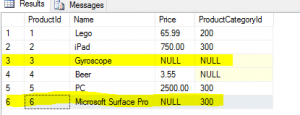
To confirm the CHECK constraint behavior we can insert a new product into #Products table without getting a Check constraint error:

INSERT INTO #Products(Name,Price, ProductCategoryId)
    SELECT 'Microsoft Surface Pro',NULL,300

This can make sense if we put the NULL logic into the context of the DB design, e.g. All products must have price greater than $0 or NULL if the price hasn’t been decided yet.

Null3UNIQUE Constraint and Set operators
It was mentioned earlier that  NULL = NULL evaluates to UNKNOWN. This means that NULLs are distinct( no two NULLs are equal)

The UNIQUE constraint treats NULL as a distinct value in the context of all other values in the column i.e ProductCategoryId can have only one NULL value and the distinct integers. However, allowing only single NULL value(inserting another NULL value will throw Violation of UNIQUE KEY constraint error), the constraint treats all UNKNOWN values(NULLS) as equal or not distinct.

INSERT INTO #ProductCategories
        SELECT NULL, 'Musical Instruments'

UniqueConstraintError

The table #ProductCategories has an UNIQUE constraint (enforced by a clustered index) on ProductCategoryId column.

The SET operators UNION, UNION ALL* , EXCEPT,  INTERSECT

Sql Server’s  Set operators treat NULLs as non distinct, in other words  as equal.
e.g. Select the rows from tables @Tab1 and @Tab2 that are common for both tables.

DECLARE @Tab1 TABLE (ID INT, Val VARCHAR(5))
DECLARE @Tab2 TABLE (ID INT, Val VARCHAR(5))

INSERT INTO @Tab1(ID,Val)
    SELECT t1.id, t1.Val
    FROM (VALUES (1,NULL),(2,NULL),(3,NULL),(4,'Dean'),(5,'Peter'),(6,'Bill')) t1(id,Val)

INSERT INTO @Tab2(ID,Val)
    SELECT t2.id, t2.Val
    FROM (VALUES (1,NULL),(2,NULL),(3,NULL),(4,'Dean'),(5,'Bahar'),(6,'Nick')) t2(id,Val)

SELECT ID AS keyValue, Val AS Value FROM @Tab1
INTERSECT 
SELECT ID,Val FROM @Tab2

NullsIntersection

As we can see from the result-set, the SET operator treats NULL values as equal e.g  Element (1,NULL ) = Element (1,NULL) and therefore belongs to “the red zone”, whereas e.g Element(5,Bahar) <>(5,Peter) and therefore was left out from the result-set.

*UNION ALL is a multi set operator that combines two sets into one non distinct set (takes all elements from both sets)

 Aggregate Functions

All Aggregate functions except COUNT(*) ignore NULLs.

DECLARE @Tab3 TABLE (ID INT NULL)
INSERT INTO @Tab3
  SELECT t.* 
  FROM (VALUES(1),(2),(NULL),(NULL),(3) ) t(i)

  SELECT  AVG(ID)   AS [AVG(ID)]
         ,COUNT(ID) AS [COUNT(ID)]
         ,SUM(ID)   AS [SUM(ID)] 
         ,MAX(ID)   AS [MAX(ID)]
         ,MIN(ID)   AS [MIN(ID)]
         ,'***'AS [***],COUNT(*) AS [COUNT(*)]
          from @Tab3

NullAgg

Note: COUNT(col1) eliminate NULLs as the other aggregate functions. However, if we try something like: SELECT COUNT(NULL+1) the function returns 0 eliminating the result of the expression, which is NULL 🙂
Another interesting thing with this, is that SELECT COUNT(NULL) throws an error – Null does not have any data type (COUNT() always does implicit conversion to INT) and e.g. SELECT COUNT(CONVERT(varchar(max),NULL)) returns 0 – now COUNT() has a datatype to work with.

Cursors (Order by)

When a query requests sorting the result-set becomes cursor – sets are not ordered. Sql Server treats NULL values as distinct and sorts the unknowns first if the sort is Ascending (Descending sort order puts NULL values  last)

SELECT * 
FROM #Products
ORDER by ProductCategoryId

NullOrder

*Just a small digression. One way to show NULL values last when  sorting in Ascending direction is to use tsql’s ability to sort record-set by non-selected columns and/or expressions.

SELECT *  ---,[NullsLast]= IIF(ProductCategoryId IS NULL,1,0)
FROM #Products
ORDER BY  CASE 
            WHEN ProductCategoryId IS NULL THEN 1
            ELSE 0
          END 
          ,ProductCategoryId

The NULL expressions results can explain the “unexpected” results  when used in anti-semi joins, but that will be covered in a separate post.

Conclusion

Three valued logic is unique to DB wold. ANSI SQL Standard provides rules/guidelines about NULL values. However, different RDBMS may handle NULLs  differently in different situations. It is important to understand how Sql Server treats NULL values in different elements of tsql language. Using NULLs  in the context of DB design can make 3VL work for you.

Thanks for reading.

Dean Mincic

Short–Circuit evaluation in Sql Server


The Short-Circuit(SC) or The minimal evaluation is the way programing languages evaluates arguments involved in Boolean expressions.
SC means that the arguments are evaluated from left to right until the value of the expression is determined. The rest of the arguments (if any left) will not be evaluated.
For example, c# evaluates the arguments (if logical operators && and || are used) from left to right.The evaluation of the expression stops as soon as the outcome is determined.

..
if(object_A !=null && object_A.methodA()) == "some value"{
 //Perform some action ;
}

With SqlServer(and RDBMS systems in general) things are different when it comes to SC. In short, in Sql Server we can not relay on the minimal evaluation. Essentially, this is because of declarative nature of TSQL language. In TSQL we almost always describe only WHAT to do (e.g Give me the list of all orders processed on a particular day from the specific geographic area made by Customers who..etc) but not HOW to do it (Query optimiser-QO and other Sql Server engine components) will find the optimal way to fulfill your request.
Therefore, the order of evaluation of the query predicates may be sequential, from left to right, but it’s not guaranteed. QO may change the ordering and/or push the predicate evaluation down the query tree e.g to the data access operator (e.g index seek).
The following example shows a few case scenarios of how Sql Server evaluates predicates(logical expressions).

Create a test table:

USE tempdb
GO
IF EXISTS(SELECT 1 FROM tempdb.sys.objects 
          WHERE object_id=OBJECT_ID('TestShortCircuit'))
    DROP TABLE dbo.TestShortCircuit
GO
CREATE TABLE dbo.TestShortCircuit(
     CurrencyId      NCHAR(3) NOT NULL 
    ,Name            NVARCHAR(30) NOT NULL
    ,CONSTRAINT PK_CurrencyId PRIMARY KEY CLUSTERED(CurrencyId))
GO
INSERT INTO dbo.TestShortCircuit(CurrencyId,Name)
    SELECT tab.id, tab.name
    FROM (VALUES  (N'AUD',N'Australian Dollar')
                 ,(N'EUR',N'EURO')
                 ,(N'HA!',N'98765')
                 ,(N'USD',N'US Dollar')
                 ) tab(id,name)
GO

Test 1: Conjunctive predicates (multiple predicates separated by AND Logical operators) and predicate evaluation sequence.

SELECT * 
FROM dbo.TestShortCircuit
WHERE  Name = 98765 AND CurrencyId = N'HA!'
--WHERE  Name = 98765
/*Msg 245, Level 16, State 1, Line 28
Conversion failed when converting the nvarchar value 'Australian Dollar' to data type int.*/

The query executes with no error.

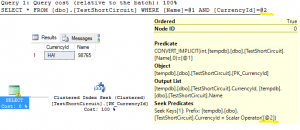
Test1Plan
Figure 1: Conjunctive predicates – second expression evaluated first

Switching the predicate places will have no effect to the QO’s reasoning.
If we ran the same query without the second expression the query would fail due to conversion error.

Successful query: Query optimiser knows that the second expression, CurrencyId = N’HA!’ includes Primary Key constraint on the column(enforced by an unique clustered index) and therefore can evaluate to true maximum once. QO decides to “push” second predicate (CurrencyId = N’HA!’e) down to the query tree to the Index Seek data access operator making it “Seek Predicate”.

If the Seek operator does not find clustered N’HA!’ the WHERE filter evaluates to false making the first expression redundant. The first expression is shown in the Predicate section of the execution plan only for consistency purpose.

On the other hand , if the operator finds the row, the first predicate will be evaluated (Name=98765). QO will then try to convert the column value(N’98765′) to INT and than to compare with the given argument(98765) . If the conversion succeed(like in the example) the query will execute with no errors. However, if the conversion fails, the query will return error

--this will return conversion error
SELECT * 
FROM dbo.TestShortCircuit 
WHERE  Name = 98765 AND CurrencyId = N'USD'

Test 1 shows that we cannot know which expression will be evaluated first(if evaluated at all) and we must not relay on the minimal evaluation.

Test 2: Disjunctive predicates (multiple predicates separated by OR Logical operators) and predicate evaluation sequence).

The query below will execute with no conversion errors.

SELECT * 
FROM dbo.TestShortCircuit 
WHERE N'A'= N'A' OR Name = 98765

The successful execution of the query may lead us to believe that Sql Server uses minimal evaluation, but it’s not the case.

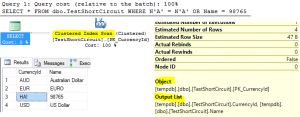
If the predicates switch the places, the query will still run with no errors. This wouldn’t be possible if Name=98765 predicate evaluated first, due to conversion error. The answer lies, again, in the way QO handles the query. In this case, during the optimisation, QO simplifies the query by excluding all predicates knowing that A=A will always evaluate to true for all rows. It simply uses table scan operator to return all rows.

Test1PlanORFigure 2: Disjunctive predicates, query simplification and SC

Test2 again shows that we the sequence of predicate evaluation is controlled by QO and is not short-circuited.

Sidenote:  the query below will fail due to conversion error (the order of the predicates is irrelevant). The QO cannot use clustered index seek because of the OR operator.  Even if we had an index on Name column, the index wouldn’t be used because of the implicit conversion on the column.

SELECT * 
FROM dbo.TestShortCircuit 
WHERE CurrencyId = N'HA!' OR Name = 98765

Conclusion:

It is not recommended to relay on the minimal evaluation in Sql Server (I would say in any DB engine) because of declarative nature of SQL language. Query Optimiser,  one of Sql Server’s relational engine components, will transform/simplify the query and during the process may reorganise the “WHERE” predicates making the order of the logical expressions irrelevant.

Thanks for reading.

Dean Mincic